What is the Afterpay Business Hub?
The Afterpay Business Hub is the new way for you to manage your merchant account.
It's a centralised workspace where you can view settlements, access Afterpay IQ insights, handle disputes, and manage your team members (with more features on the way!)
How do I log in to the Hub?
Head to the Hub and sign in by entering the email associated with your account and your password.
You’ll then be sent an email containing a unique 6 digit code, enter this code when prompted on the screen. Make sure you check your junk/spam folder!
If you don’t receive the email, you’ll have the option to re-send the code. If you’re having trouble receiving the email, please get in touch so that we can assist you.
How do I access the Hub?
If you want a team member to access our Business Hub, you will need to create a user. It’s very simple!
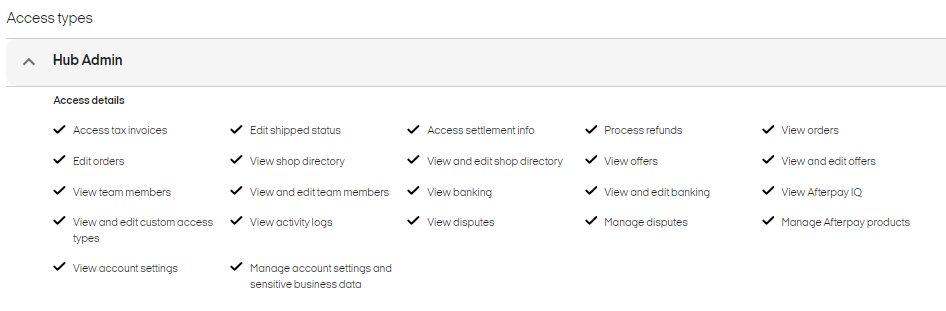
Before you create a user account, there are three access types: Hub Admin, User & Read Only.
| Access Level | ||
Permissions | Hub Admin | User | Read-Only |
Access Tax Invoices | ✅ | ✅ | ✅ |
Edit Orders | ✅ | ✅ | ❌ |
View team members | ✅ | ✅ | ✅ |
View and edit custom access types | ✅ | ❌ | ❌ |
View Account Settings | ✅ | ✅ | ✅ |
Edit Shipped Status | ✅ | ✅ | ❌ |
View Shop Directory | ✅ | ✅ | ✅ |
View and Edit Team Members | ✅ | ✅ | ❌ |
View Activity Logs | ✅ | ❌ | ❌ |
Manage Account Settings and Sensitive Business Data | ✅ | ❌ | ❌ |
Access Settlement Info | ✅ | ✅ | ✅ |
View and Edit Shop Directory | ✅ | ✅ | ❌ |
View Banking | ✅ | ❌ | ❌ |
View Disputes | ✅ | ✅ | ✅ |
Process Refunds | ✅ | ✅ | ❌ |
View Offers | ✅ | ✅ | ✅ |
View and Edit Banking | ✅ | ❌ | ❌ |
Manage Disputes | ✅ | ❌ | ❌ |
Once you know what user type to give to your team member, follow these steps:
Select Team Members from the navigation menu.
Select Invite Team Members.
Enter these details for each new team member:
Email address
Full name
Access level
Select Next.
Review the list of team members to be invited, then Confirm.
Each new team member will then receive an invitation email to set up their account and create a password. If a team member already has an existing Afterpay profile, they don't need to create a new password. They'll be able to launch the Afterpay Business Hub as soon as they've been invited.
Need access to handle disputes?
A user or admin role can manage disputes in the HUB.
The elements that need to be ticked to enable this functionality are:
View disputes
Manage disputes
You will be able to manage Team Member Access via Access Management - just tick the disputes options (see below).
NOTE: When updating a Case Document, the maximum character limit is 500 characters. Exceeding this will produce an error message: Something went wrong. Please try again.