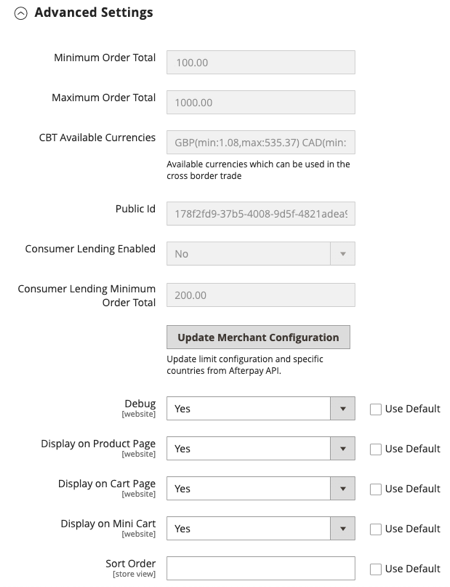
Explanation:
You cannot directly update your Afterpay minimum/maximum purchase limits through the Magento admin panel or the Afterpay plugin settings. These limits are set on the Afterpay side based on your agreement, risk profile, and other internal criteria.
Action:
Contact Afterpay Support
To increase the minimum/maximum purchase limits, please contact our Merchant Support team through your Merchant Portal or reach out to your Relationship Manager
Confirmation
Await confirmation from the Afterpay team that the request has been approved.
Login to Adobe Commerce Admin once the limit update has been approved
Go to Stores → Configuration → Sales → Payment Methods → Afterpay → Advanced Settings.
Click “Update Merchant Configuration” to reflect the new limit from Afterpay API.
Clear cache and the new limit will be updated accordingly.